
Spectrum tab
Spectrum & Interference Scanning
The interference check legacy desktop monitoring tools always left for WISP techs to do by hand — exactly what you reach for when a link degrades and you need to know congestion/interference vs. a hardware fault.
What it shows
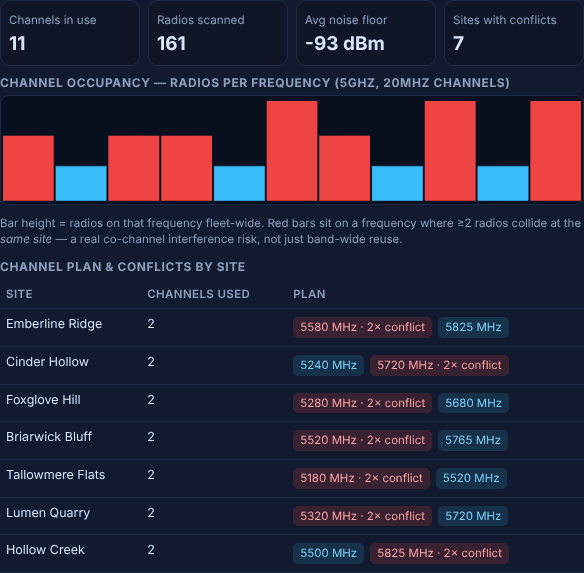
Every wireless radio's assigned channel is bucketed fleet-wide into an occupancy chart, so you can see at a glance which frequencies are busiest across the whole network. Average noise floor is tracked alongside it.
Automated conflict detection
A per-site table flags any two sector APs assigned the same channel close enough to interfere — a real co-channel conflict, not just band-wide reuse — colour-coded red so it can't be missed in a long list. This is the detail that usually only surfaces after a customer complaint; here it surfaces the day the second AP is deployed.
Where it fits
Found a conflict or a noisy channel? The per-AP client roster shows exactly which CPEs are actually struggling because of it, and the linked how-to guide above walks through fixing it step by step.